How to buy cryptocurrencies
 14 minutes|Yann Gerardi|Published 2020-04-17|
To buy cryptocurrency in self-custody, you need three things: a wallet address you control, a fiat payment method, and an exchange service that delivers to that address. Bank transfers cost the least and usually settle within hours; card payments are instant but cost more and always require identity verification. Mt Pelerin, a Swiss regulated financial intermediary, lets you buy crypto in 18 fiat currencies and delivers crypto directly to your own self-custodial wallet.
What you need to buy cryptocurrency
Buying crypto involve the same decisions wherever you go, whatever service you use. Get these right once and every purchase after that will be routine.
1. A wallet you control
The crypto you buy has to be delivered somewhere. That destination is a wallet address, and there are two kinds:
Custodial
You buy crypto on a platform that holds your crypto and shows you a balance. You are trusting the company to manage the custody of your funds correctly, remain solvent and let you withdraw your funds without barriers. Most large exchanges work this way, and needless to say they go against the very ethos of why cryptos exist in the first place.
Self custodial
You buy crypto directly on a wallet that you control, by holding its private key / secret phrase. The crypto is yours regardless of what happens to the company who sold you the crypto. Nobody can freeze it, and nobody can recover it for you if you lose the phrase.
If you plan to hold rather than trade, self-custody is the right choice. To do so, you will need a wallet app before you buy, not after. Bridge Wallet is the free self-custodial app we make, and our guide to creating a wallet address walks through the setup if you have never done it. Any other self-custodial wallet works with our service, including MetaMask, Rabby, Ledger and Trezor.
2. Choose where to buy
When choosing a service to buy crypto, pay attention to these various points that matter in practice:
- Where the crypto lands: Some services can only credit an internal account. Others send the crypto directly to an address you own, which means no withdrawal step, no withdrawal fee and no risk of funds being blocked by the provider.
- How it's regulated: Check the jurisdiction and the supervisory framework, not just the marketing. How a crypto service is regulated will impact how your bank considers it when sending funds to it. Mt Pelerin is a Swiss financial intermediary, affiliated with SO-FIT under FINMA's anti money laundering framework.
- The fees and the real cost: A low advertised service fee means nothing if the exchange rate is bad or if there are other hidden costs. Compare the total amount of crypto that lands on your self-custodial wallet for the same amount of fiat paid, not the advertised percentages.
- Which fiat currencies are supported: Paying in your own currency avoids a conversion charged by your bank on top of the exchange fee. With Mt Pelerin, you can buy crypto in 18 fiat currencies.
3. Choose to buy by card or by bank transfer
This is the decision that determines what you pay and how fast you receive your crypto. Card purchases are quicker, while bank transfer are much cheaper.
To illustrate, the table below shows you the differences between buying crypto by card of by bank transfer with Mt Pelerin:
| Bank transfer | Card, Google Pay, Apple Pay | |
|---|---|---|
| Exchange fee | 0% to 1.3% No spread | 2.5% to 3.8% No spread |
| ID verification | Not required up to CHF 999 per rolling 30 days | Always required |
| Payment speed | Some bank transfers are instant (SEPA Instant, FPS), some are not and can take from one to several business days depending on the route. | Instant |
| Crypto delivery | A few minutes to a few hours after the payment is received, depending on liquidity and network conditions. | |
| Min. per transaction | None | CHF1.20 |
| Max. per transaction | CHF 100,000 (use our OTC service for more) | CHF 5,000 |
| Recurring purchases (DCA) | Yes, bank details and payment reference stay constant, so you can set up standing orders. | No |
| Best for | Lowest cost, automated recurring purchases | Urgent purchases, countries where bank transfers are not convenient |
A note on timing
Crypto prices move sharply, and trying to pick the bottom is how most first time buyers lose money. Buying a fixed amount at a fixed interval, regardless of price, is known as dollar cost averaging, or DCA. Because our bank details and payment reference stay the same for a given combination of currency, crypto and receiving address, you can automate this with a standing order at your bank and stop thinking about it.
Below is how each of the steps above works in practice with our service, first via our web app and then in our mobile app.
💻 How to buy crypto with our web app
With our exchange service, you can buy cryptocurrencies easily and receive them directly on any of your existing wallets, as long as it is self-custodial app (meaning that you control the wallet address and its private key / secret phrase).
This step-by-step tutorial below shows you how it works:
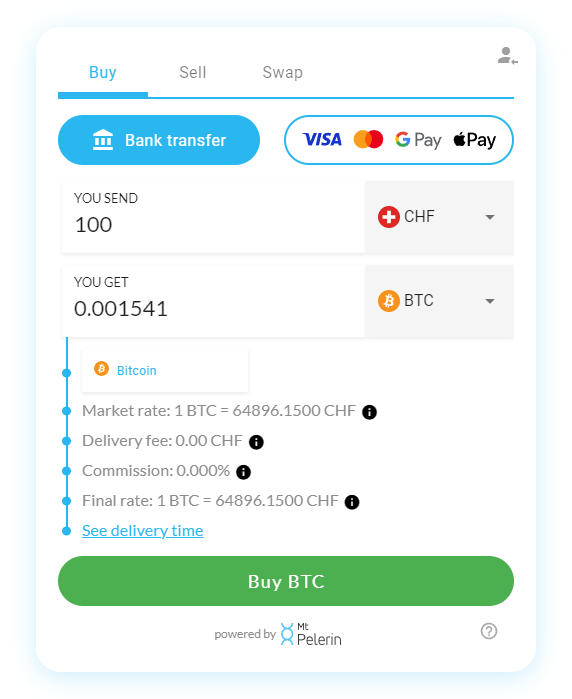
1. Go to our web interface
You can access it on our website here or through any other partner website. It looks like this:
2. Choose the purchase method
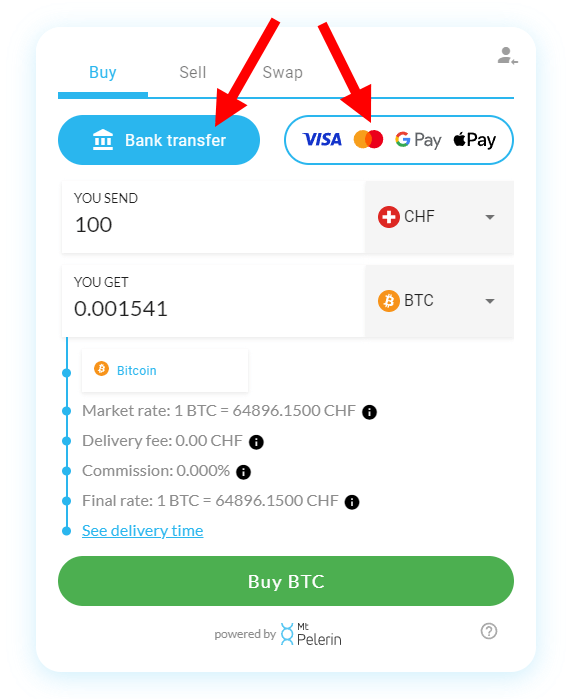
Choose first if you'd like to buy crypto by bank transfer, or by card / Google Pay / Apple Pay. The fees and delivery speed are different for both. Please note that identification is mandatory to buy crypto by card, but not by bank transfer.
3. Choose what you want to buy
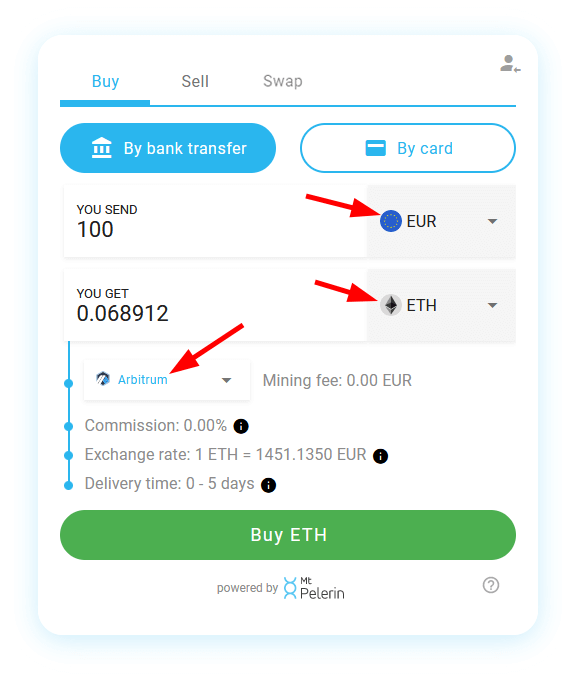
Select in which fiat currency you'd like to buy crypto, the crypto you want to buy, and the blockchain on which you'd like to receive it (if available). Then, click the green "Buy" button to continue:
4. Register or login
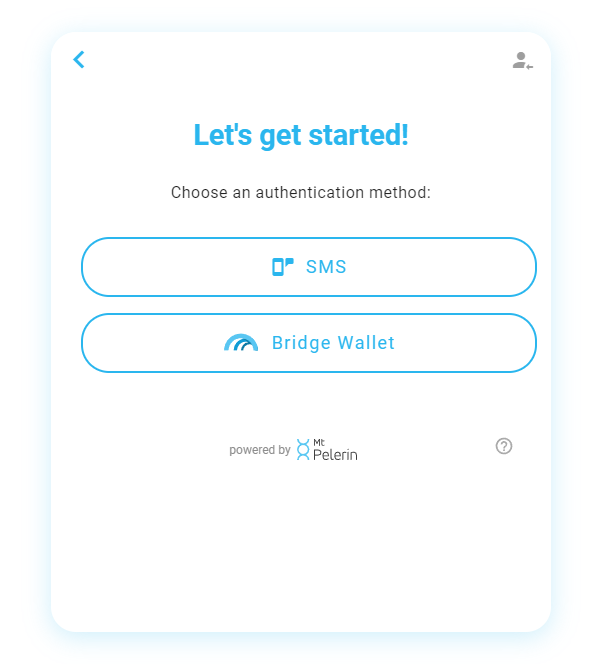
All you need to register is an email address and one of these authentication methods:
- SMS: you will need to provide a phone number and confirm it with an SMS code.
- Wallet signature: Download Bridge Wallet, create or restore a wallet, then go in the user profile menu on the top right of the app's main screen, and choose the signature option. You can then use the "Login with Bridge Wallet" option here.
If you already have a profile with us, login with one of the methods available to continue. For this example, we choose the SMS option:
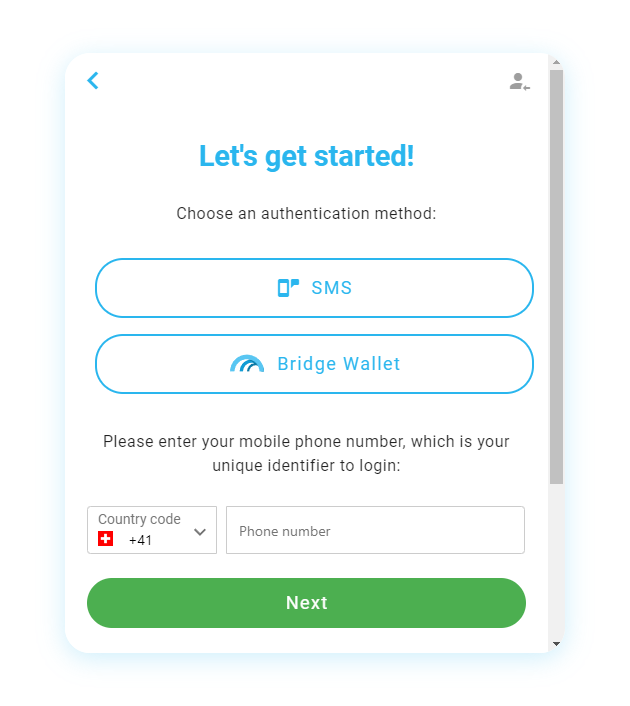
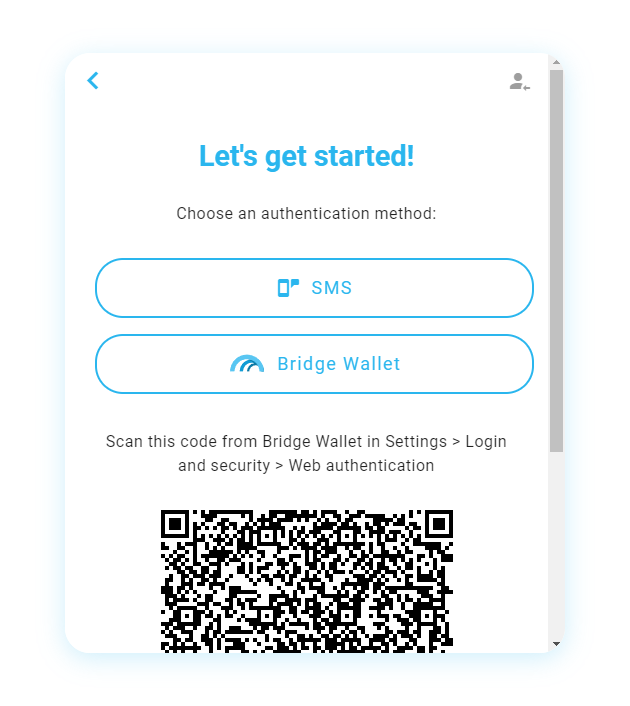
5. SMS code confirmation
Enter the code that you have received by SMS. If you haven't received any, you can ask for a new one after the timer cooldown:
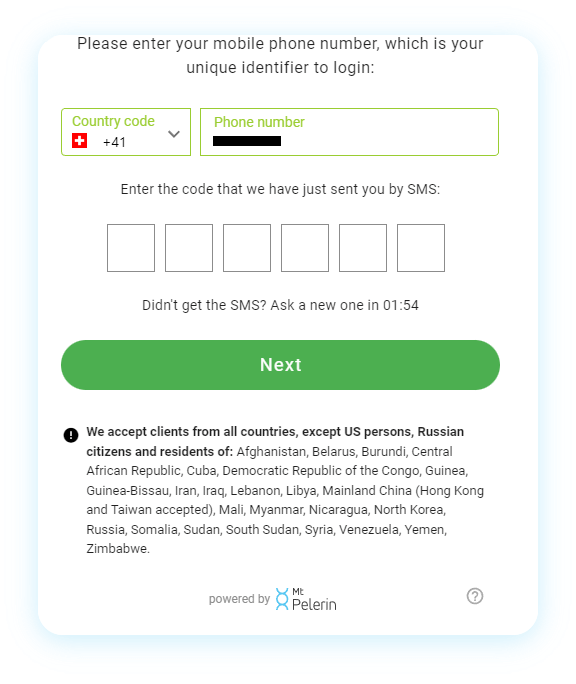
6. Email
Enter an email address, where you will receive notification emails about your transactions:
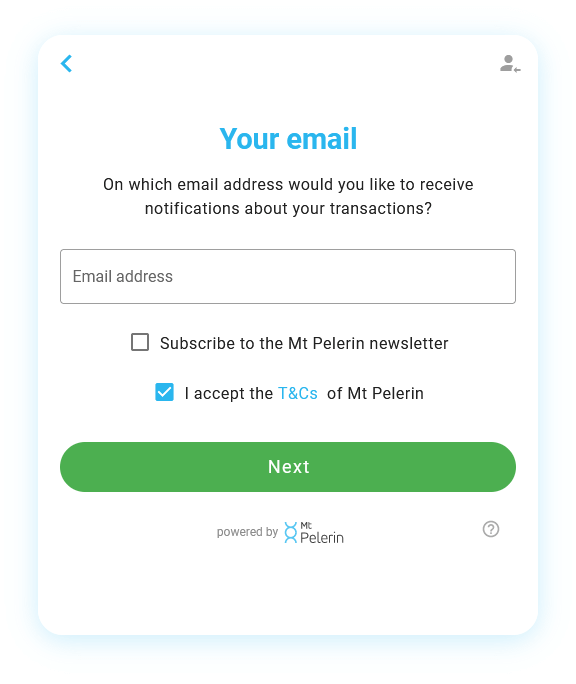
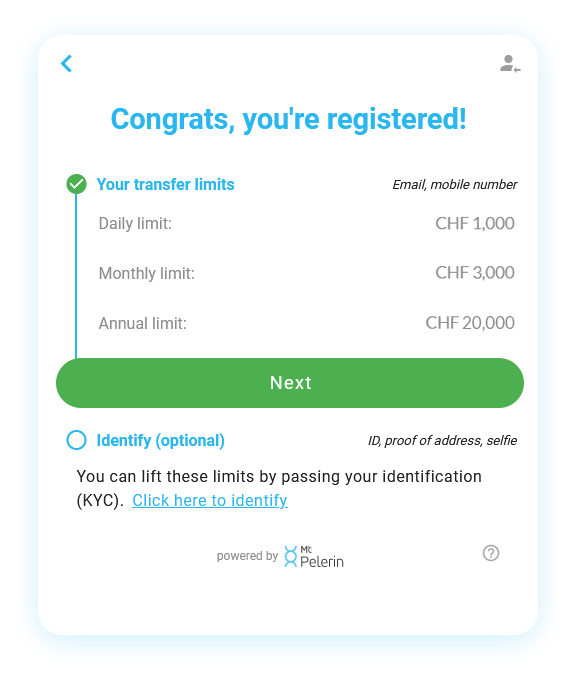
7. Registered
You will see here your profile status and your buy/sell/swap volume limits. Click "Next" to continue:
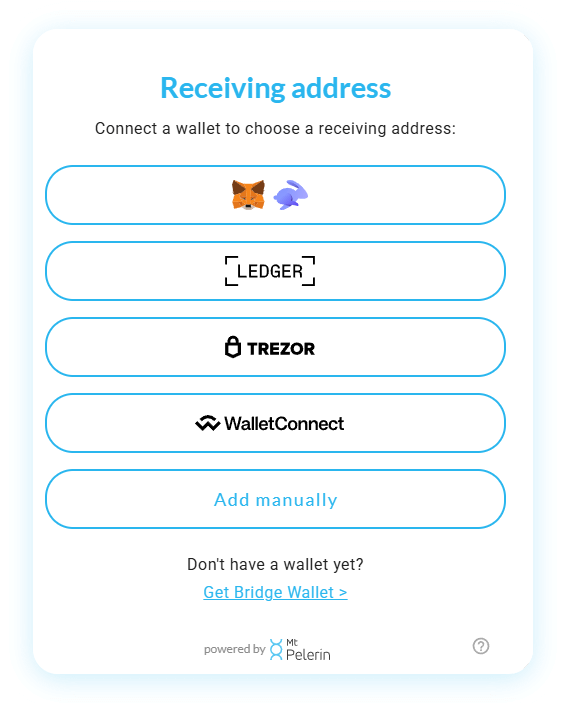
8. Receiving address
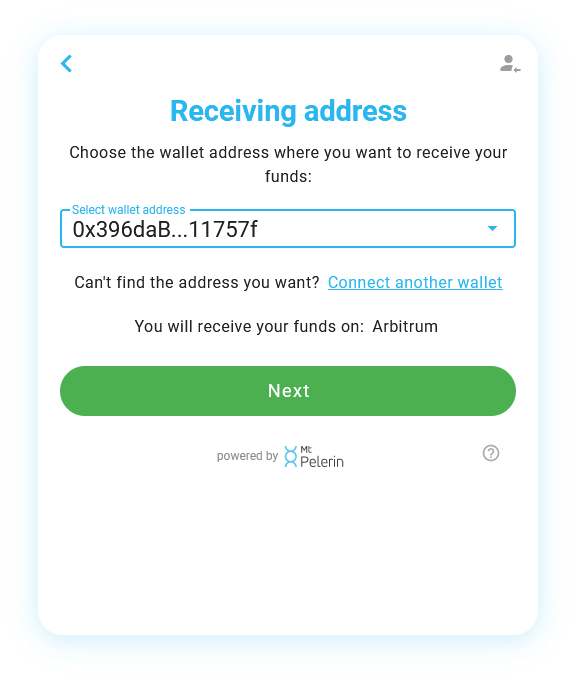
Choose one of the available options to connect a wallet and choose the address on which you will receive your crypto. See here for a detailed tutorial. If you already have a profile with us, you will be able to choose one of the wallet addresses that are linked to your profile, or add a new one:
9. Payment
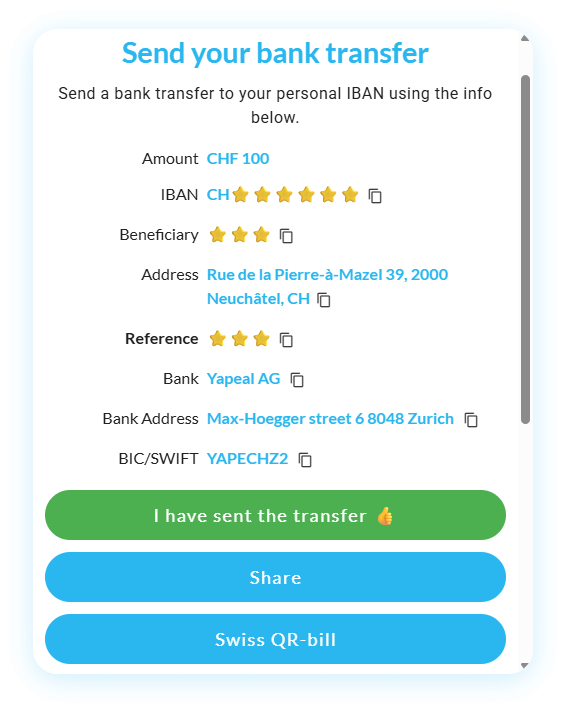
If you have chosen to buy crypto by bank transfer, you will see here our bank account information and the possibility to generate a Swiss QR-bill (which can be used for cash payments in Switzerland). Follow the instructions to make your bank transfer, and you will receive a notification as soon as we receive it. See "Bank transfer times" for more info.
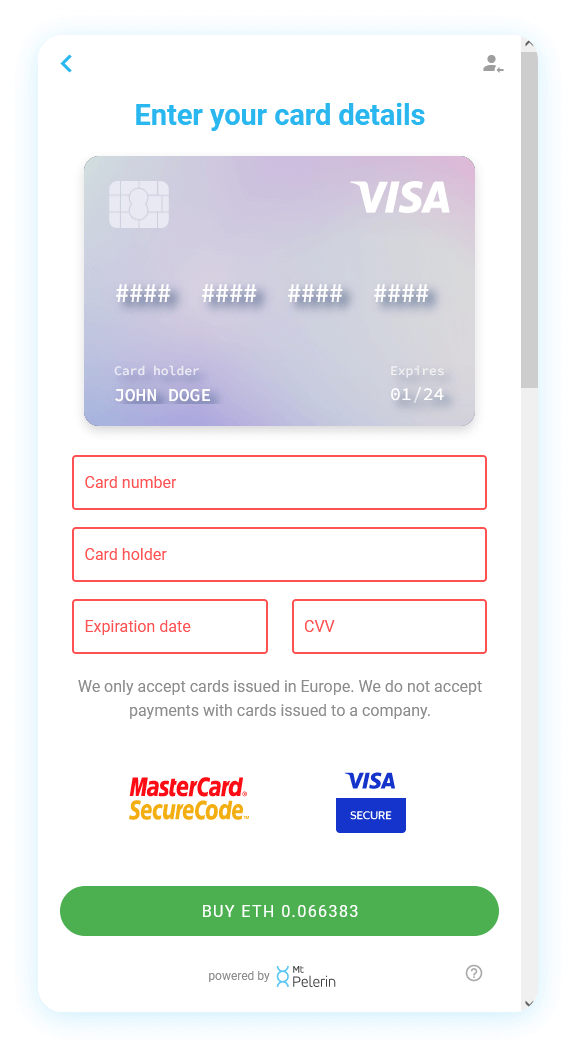
If you have chosen to buy crypto by card, enter your card details and confirm. Please note that once your payment has been confirmed, your crypto can take from several minutes up to several hours to be delivered on your wallet. See "Delivery time of card purchases" for more info.
📱 How to buy crypto with our mobile app
If you don't have a crypto wallet yet, downloading our mobile app is the easiest way to get started if you want to buy cryptocurrencies. This step-by-step tutorial below shows you how it works:
1. Download Bridge Wallet
Bridge Wallet is the free mobile app that we've made to easily invest in crypto assets and manage them from your phone. To download it, click the button below:
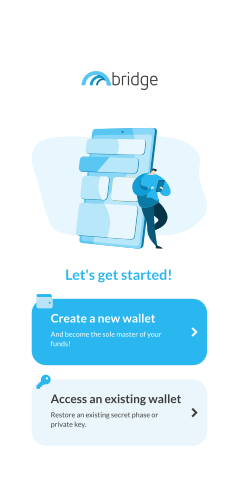
2. Create a new wallet
Create a new wallet, or restore an existing one if you prefer to. If you need help on the creation of a wallet, we have made a step-by-step guide here.
3. Register or identify
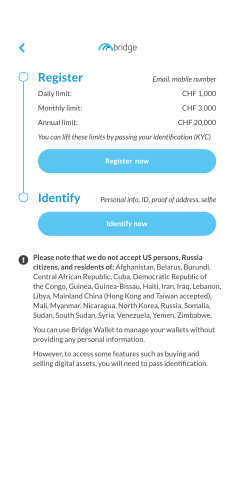
Go in the user profile menu on the top right of the app's main screen, choose an authentication mode then provide an email address on which you will receive notifications about your transactions.
Registering allows to buy crypto by bank transfer up to CHF 999 per period of 30 days (or equivalent in other currencies).
To buy crypto above this limit or to buy crypto by card, you will need to identify. For more info, please see our support page.
4. Choose a crypto
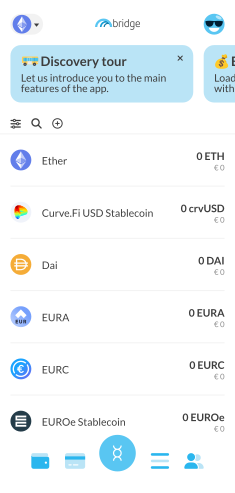
The cryptocurrencies available to buy are all displayed by default in the app. You can see the full list on this page as well.
Please note that we have different cryptocurrencies available on different networks. To switch network, use the network icon on the upper left of the screen.
5. Add funds
Once you have chosen a cryptocurrency to buy, click on the "Add" button.
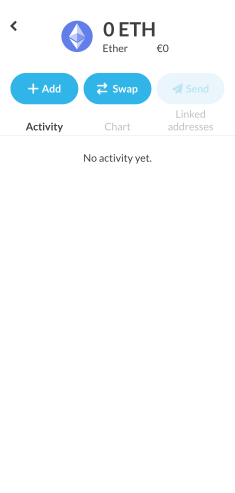
6. Choose your purchase
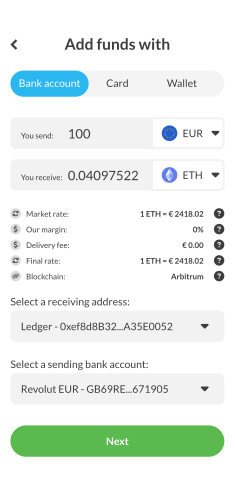
Choose the purchase method by selecting the "Bank account" or "Card" tab. You can then choose to buy cryptocurrency in 18 different fiat currencies. Select one of them, enter a purchase amount, and you will see our all-inclusive exchange rate.
By default, your receiving address is your Bridge Wallet address. You can also receive your crypto directly on another address. To do so, you will need to link it first to your profile, here is how to do it.
7. Make your payment
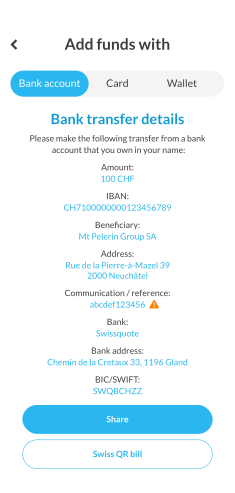
If you have chosen to buy crypto by bank transfer, you will see here our bank account information and the possibility to generate a Swiss QR-bill (which can be used for cash payments in Switzerland). Follow the instructions to make your bank transfer, and you will receive a notification as soon as we receive it. See "Bank transfer times" for more info.
If you have chosen to buy crypto by card, enter your card details and confirm. Please note that once your payment has been confirmed, your crypto can take from several minutes up to several hours to be delivered on your wallet. See "Delivery time of card purchases" for more info.
🙋♂️ FAQ
Do I need a wallet before I start?
Yes you need a crypto wallet, but if you don't have one yet you can simply download our mobile app Bridge Wallet to get started.
Should I use the web app or the mobile app?
If you don't have a crypto wallet yet, you should use the mobile app as it will create one for you. If you already have a crypto wallet with any other app than ours, then you should use our web app as you will be able to connect your existing wallet there to buy crypto on it.
How do I find my wallet address?
In Bridge Wallet, when you are on the main wallet screen simply click on the little QR-code icon to show your wallet's public address. On other wallet apps, you can usually find your address by clicking a "Receive" button.
What is the difference between signing up by SMS and by wallet signature?
Both create a user profile and are bound to it as an authentication method. If you use a third party wallet, you will need to sign up by SMS. If you use our mobile app, you can choose to sign up via wallet signature, which is better in terms of privacy, costs nothing and sends nothing on-chain.
What happens if I pick the wrong blockchain when buying?
The crypto you buy are sent to your address on the blockchain you have selected. Once delivered, this cannot be reverted. If you want to move your crypto to another chain, you will need to use our swap feature.
Can I close the page after placing my order?
If you buy crypto by card, you can close the page once you have made your payment and have reached the payment confirmation screen. If you buy by bank transfer, you can close the page after you have received our bank account coordinates, used them to send your bank transfer, and clicked on the button that says "I have sent the transfer".
Can I cancel or change an order after placing it?
It's not possible to cancel a purchase once your crypto have been delivered to your wallet. If you have made your payment but haven't received your crypto yet, you can try to contact us and we will see if it's still possible to cancel your order.
The price of the crypto I bought moved between my order and the receiving of my bank transfer. Which rate applies?
The rate applied is the market rate of the moment we receive your payment.
What happens if I forget to include the purchase reference in my bank transfer?
In such case, please contact us to send us the missing reference (which you can find at all times by simulating the same purchase again). If you don't contact us first, we will send you an email when we receive your bank transfer without a purchase reference.
What happens if I send a bank transfer of a different amount than I ordered?
That's not a problem at all, we will simply convert the amount we receive and deliver the corresponding crypto amount to your wallet.
My payment arrived but I don't see the crypto in my wallet, why is that?
When we receive a payment, the delivery is not instant. We deliver funds as fast as possible and it is usually done in a matter of minutes, but it can sometimes be longer due to various operational or compliance reasons. Make sure as well that we didn't send you an email after we received your payment.
How do I check the status of my order?
Once you complete a crypto purchase, you will receive through our interface and by email a unique tracking link to follow your order.
Where do I find a receipt or my transaction history?
You can browse your transaction history and make PDF / CSV exports of them both in our mobile app on the transaction screen and on app.mtpelerin.com in the "Transactions" tab.
Do I have to repeat all these steps every time?
No, not if you pay by bank transfer. Our payment details stay fixed for a given combination of three things: the crypto, the chain, and the receiving address. As long as those three stay the same, you can reuse the same IBAN and payment reference for any future purchase, in any amount, without going through the order flow again. You can also set up a standing order at your bank so purchases happen automatically. If you change any of the three, place a new order to get the matching payment details.

About the author
Yann is the head of marketing of Mt Pelerin. He fell down the rabbit hole of crypto at the end of 2017, when he joined the assembling team that would give birth to Mt Pelerin.